
A useful text message analyzer should show its work. It can extract messages from screenshots, group emotional and conversational signals, measure visible patterns and link conclusions to concrete excerpts. It should also state what it cannot infer. A score without examples may feel decisive, but it gives you little basis for checking whether the analysis fits.
How a screenshot analyzer works
The first step is text extraction. The tool reads visible names, message bubbles and timestamps from one or more screenshots. The second step is classification: it identifies possible tone, emotional wording, topics and interaction patterns. Finally, it turns those observations into a report.
Errors can enter at each stage. Small text may be misread. A reaction emoji may attach to the wrong message. Sarcasm may look literal. Check that the extracted examples match the screenshot before relying on the summary.
Four parts of a useful conversation report
First, it should separate participants so you can compare communication rather than blend every line together. Second, it should show examples for claims about tone or behavior. Third, it should describe the exchange as a whole, including positive attempts at connection. Fourth, it should offer modest next steps instead of dramatic predictions.
- Participant-level emotions and observed tones
- Message balance, response time and notable pauses
- Specific excerpts linked to a pattern
- A summary that includes strengths, concerns and possible actions
What Clarity Chat includes
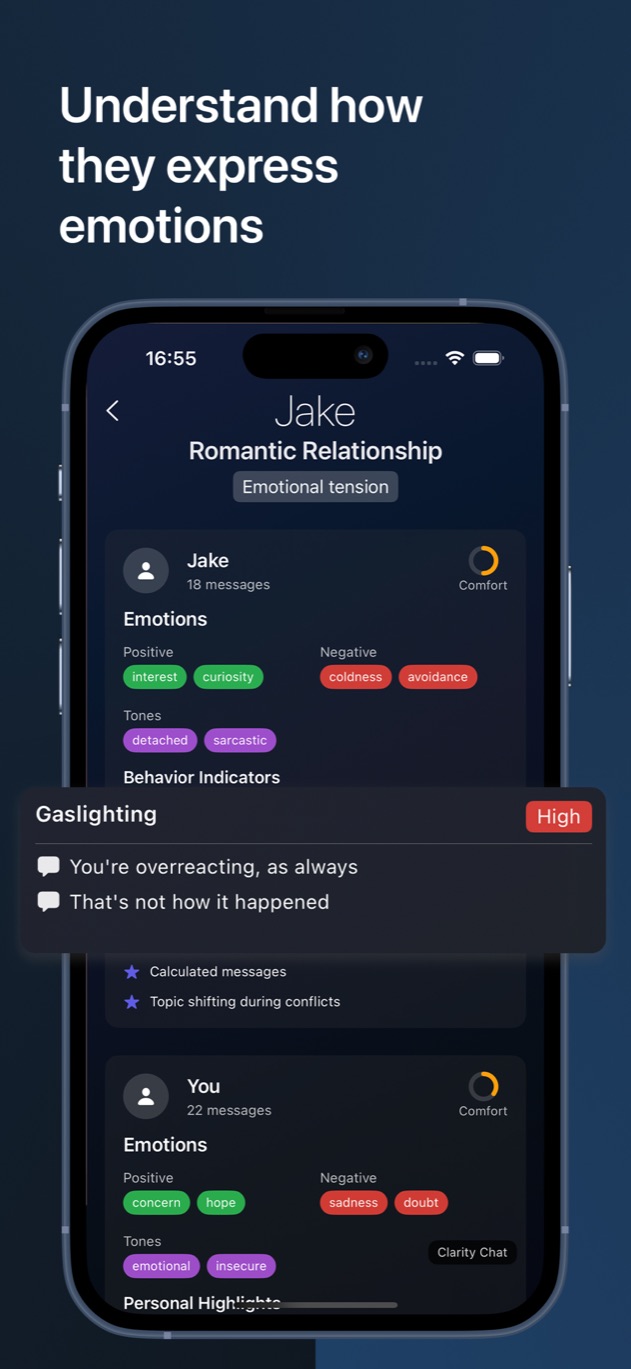
Clarity Chat accepts up to four screenshots in one analysis. Its report can show positive and negative emotions, tones such as detached or sarcastic, comfort indicators, personal highlights, message counts, average response times, interruptions, quiet moments, topics and sentiment changes.
The app also displays behavior indicators with examples and a conversation summary with recommended actions. Those features are best used to find the part of the chat you want to revisit. They do not turn a limited sample into a full psychological profile.
Privacy questions to ask before uploading a chat
Find out whether screenshots leave the device, whether the service stores them and whether data is reused for advertising or model training. Clarity Chat’s published policy says conversations are processed once and are not stored, shared, reused or sold for advertising. The analysis still requires secure server processing.
Crop names or unrelated personal details. Avoid uploading financial, medical or intimate information that is not necessary. A conversation involves more than one person, so use the minimum amount of material needed for your own lawful reflection.
How to judge the result
Start with extraction accuracy, then examples, then summary. If the quoted message is wrong, the label built on it is unreliable. If the quote is right but the label ignores a clear joke or shared history, keep the quote and reject the interpretation.
Compare the report with a second sample from another day. A stable pattern is more informative than an unusual exchange. Use the report to decide what you want to ask or change, and leave claims about another person’s mind where they belong: unresolved until that person communicates clearly.
Questions about this guide
Can a text message analyzer read screenshots from any app?
It can usually read clear screenshots from common messaging apps, regardless of the brand. Results depend on legible text, correct ordering and enough context.
Does a high behavior score prove manipulation?
No. A score is an automated interpretation of the selected text. Review the examples, look for repetition and seek human support for serious concerns.